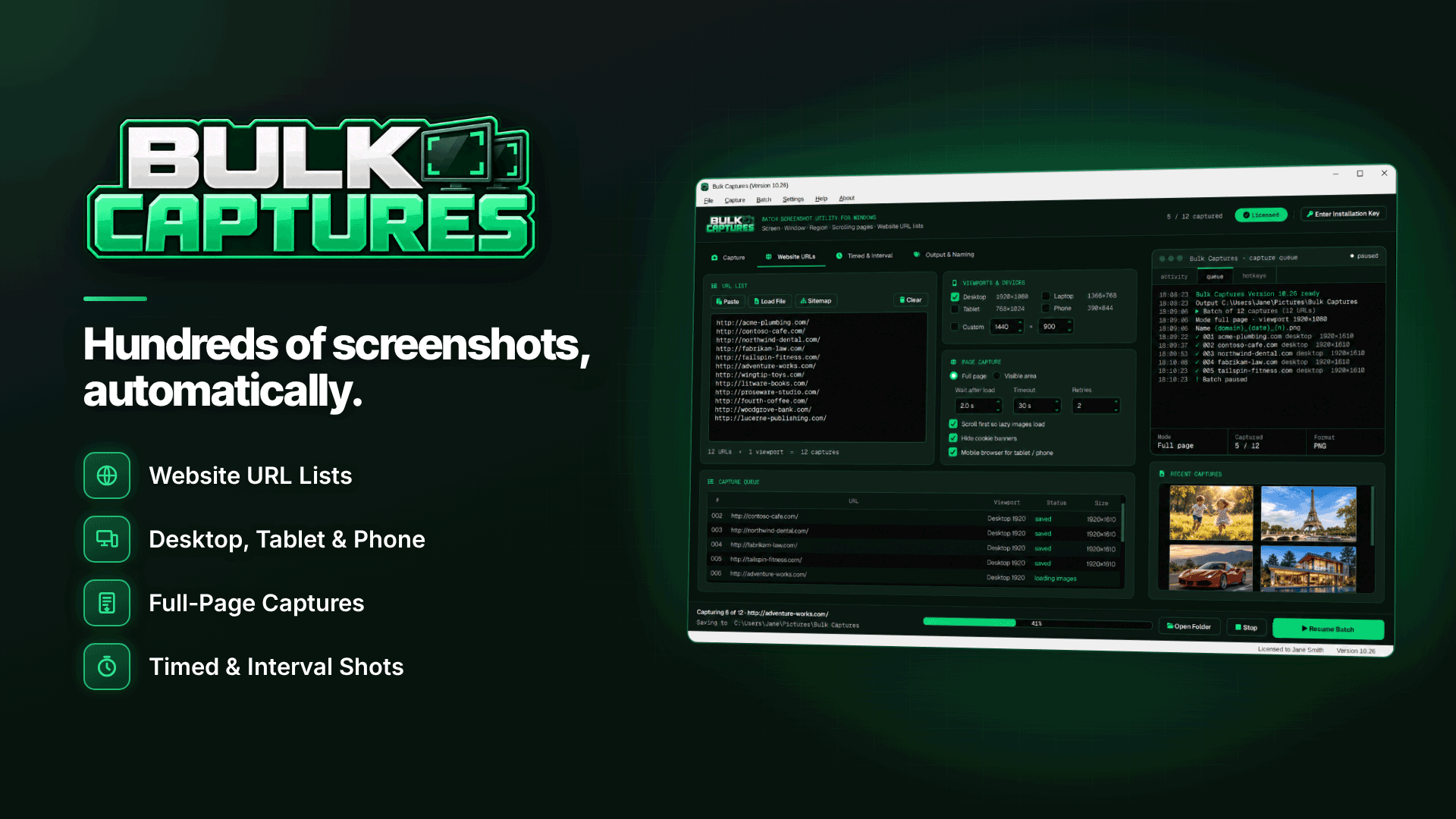
How do I screenshot a website at different screen sizes? Load the same URL at several viewport widths (typically desktop, tablet and phone) and save a full-page capture at each, ideally in one batch so every page in your list is checked the same way. Bulk Captures is a Windows tool built for that: paste or import a list of sponsors' landing pages, choose the viewports and it captures them all in one run.
For adult affiliates, that has two practical uses: checking how programmes' landing pages render before you send traffic, and producing consistent, watermarked site thumbnails for review and directory listings. Here is how both work, and where the tool's limits are.
Why check landing pages on mobile and desktop?
Plenty of adult traffic arrives on phones, yet many sponsor pages are designed and tested on desktop first. Common problems only show up on a phone:
- The join or sign-up button sits below the fold or behind a sticky banner.
- Age-verification or consent overlays cover the whole screen and look broken.
- Tour images fail to load, leaving empty frames.
- Text from the desktop layout becomes unreadably small.
- Geo-targeted versions show different offers in different countries.
Any of these will hurt conversion, and you only see them by looking. Our guide to adult landing pages that convert sets out what a good page should include; screenshots let you check sponsors against that standard. Visual checks are also part of choosing an adult affiliate program for European traffic.
What is Bulk Captures?
It is a batch screenshot utility for Windows 10 (version 1809 or later) and Windows 11, 64-bit. Alongside ordinary screen, window and region capture, it can process whole lists of websites using its own built-in browser engine, naming and saving each file automatically. For landing-page work, the relevant features are:
- URL input: pasted URLs, TXT, CSV or TSV files, drag-and-drop lists, sitemap files or a sitemap import from a site address, with duplicate URLs removed.
- Viewports in one run: desktop, laptop, tablet, phone or custom sizes from 240 to 7,680 px wide, plus a mobile-browser option.
- Page handling: waits for the page to load, scrolls to load lazy images, can hide common cookie banners, and lets you set wait-after-load, timeout and retries.
- Capture type: full page or visible area only, which is useful for an above-the-fold check.
- Queue control: live per-page status with pause, resume, stop and retry-failed.
- Naming: tokens for date, time, counter, domain, mode and viewport, with dated or per-domain sub-folders.
- Post-processing: resize to a fixed width, create thumbnails, add a text or logo watermark, a border or a drop shadow across the whole batch.
- Output: PNG, JPG, WebP, BMP, TIFF or one multi-page PDF per batch.
How to check sponsors' landing pages in one batch
- List the pages. Put each programme's landing page, tour and join page into a CSV, one per line. Include the actual tracking URLs you will use if you want to confirm that redirects resolve.
- Pick viewports. Phone and desktop at minimum, tablet if you buy tablet traffic.
- Use visible-area capture for an "above the fold" view, and a second pass with full-page capture for the whole layout.
- Allow enough wait time for tours with heavy scripts, and set a retry or two for slow sponsors.
- Name by domain and viewport so you can compare one programme's phone and desktop views side by side.
- Review and score each page against your checklist, then repeat monthly so you notice redesigns.
Running the check from a European connection also shows you the version European visitors see, which matters when programmes geo-target offers. You can find the full feature list on the Bulk Captures website.
Keep it safe for work: sponsor tours may contain explicit material. Store captures privately, and only publish images that comply with the programme's terms and the rules of the site where they will appear.
A simple scorecard for reviewing the captures
Screenshots are only useful if you judge every sponsor the same way. A short scorecard, filled in from the phone capture first, keeps the comparison honest:
| Question | Pass | Fail |
|---|---|---|
| Is the main call-to-action visible without scrolling on a phone? | Button in the first screen | Hidden below banners or overlays |
| Does the page load fully within your wait time? | Images and text all present | Empty frames or spinners |
| Is the age or consent step clean? | Clear, readable overlay | Overlapping or broken layout |
| Are terms and the offer readable? | Legible on a small screen | Tiny or cut-off text |
| Does the desktop view match the phone offer? | Same offer on both | Different or missing offer |
A sponsor that fails two or more of these on phones is worth raising with your affiliate manager before you buy traffic. Keep the dated captures with your notes so you can show exactly what you saw.
Website thumbnail images from URLs for review and listing sites
If you run a review site or a directory of programmes, you need a consistent preview image for each listing. Capturing them one by one is tedious and inconsistent. In a single batch you can capture every programme's homepage at the same viewport, then let post-processing resize each to a fixed width, make thumbnails and add your own watermark so scraped copies point back to you. Re-running the same list later refreshes every image at once.
Check each programme's media and branding rules first. Many supply approved promotional assets and prefer you to use those; others are happy for you to show a homepage screenshot. Our guide to building an adult review site that earns trust covers presentation and transparency.
Honest limits
- No browser logins: website batches do not use your browser sessions, so members' areas and affiliate dashboards need scrolling-window, active-window or region capture instead.
- Cookie banners: hiding covers common banners only; age gates and unusual overlays may still appear.
- Windows only: there is no Mac version listed.
- Activation: you can build URL lists and settings beforehand, but capturing requires an activated key.
- Scrolling capture of ordinary windows works only where the window responds to mouse-wheel scrolling.
Frequently asked questions
Can I screenshot multiple websites at once?
Yes. A batch can include URLs from many different domains, and per-domain sub-folders keep each programme's captures together. No fixed limit on URLs per batch is stated.
Will it capture what a visitor in another country sees?
It captures what the page serves to your own connection. If you need another country's view, run the batch from a connection located there.
Does it replace testing on real phones?
No. Viewport captures catch most layout issues quickly, but always click through the key pages on a real handset before committing serious traffic.
Next steps
Use the same approach for your own site with our guide to screenshotting every page from a sitemap, and compare sponsors in our affiliate programs directory. If you want multi-viewport landing-page checks and watermarked listing thumbnails from one URL list, try Bulk Captures.